

The “Code Vibe” Trap

How to Surf the Wave Without Drowning in Bloat
There’s a new kind of flow state in software development…
Opening an AI tool and use prompts like this:
> Add retries to the payment service
> Expose the internal state via an endpoint
> Add validation tests
Seconds later, the feature exists.
Andrej Karpathy coined this “Vibe Coding”: a mode where the distance between idea and implementation nearly disappears. It feels like surfing a perfect wave—effortless, fast, euphoric.
But after weeks (or months) of vibing, many teams notice the same unsettling pattern:
The codebase works
Velocity is high
Yet the architecture feels… off
Duplication creeps in
Naming drifts
Abstractions multiply without purpose
It starts to feel like a city that grew without a plan.
Welcome to the Code Vibe Trap.
This post is about how to keep the speed without waking up inside a concrete maze no one understands—not even the AI.
The Mechanism of the Trap: The Itinerant Contributor
Why does Vibe Coding so often degrade architecture?
Because the LLM behaves like an itinerant contractor.
Highly skilled.
Incredibly fast.
But with no long-term memory of the city it’s building.
Each prompt is treated as a fresh construction job.
You ask for a date formatter → it creates a new helper instead of reusing DateUtils
You ask for a DTO → it generates one almost like the others, but with slightly different validation rules
You ask for a quick fix → it imports a library just to solve that one problem
The result is a kind of architectural urban sprawl:
The Grey Goo Scenario
DRY Violations
Business logic scattered across controllers, services, helpers, and “temporary” utils.
Zombie Dependencies
Libraries pulled in for one-off usage, never consolidated, never removed.
Loss of Mental Model
You didn’t write the code, so you didn’t form the navigation map.
You are now a tourist in your own software.
A Better Analogy: Surfing vs. City Planning
Vibe Coding is like surfing a powerful wave.
Architecture is the reef beneath the surface.
If the reef is well-shaped, the wave carries you forward with stability and control.
If it’s chaotic, shallow, or jagged—you wipe out.
You don’t want to stop surfing.
You want constraints that shape the wave.
That’s where architecture becomes your hard boundary.
Architecture as the “Hard Deck”
Instead of trusting discipline alone, assume the AI will drift.
Your job is not to slow it down—but to build rails it physically cannot cross.
Below are three rules that keep the vibe while preserving structural integrity.
1. The Linting Firewall
In the Vibe Coding era, linters are no longer cosmetic.
They are architectural enforcement tools.
Manual code review is too slow to catch subtle AI drift.
You need instant, automated rejection.
Examples of Non-Negotiables
Strict typing at boundaries
No Any or raw Map<String, Any> in APIs
Explicit layering rules
Type Discipline at the Edge
AI always tries to demonstrate things in a generic way (which is good but often not what we are looking for). In the example below we can see what AI tries to do… a generic input Map that can fit Anything. But we want it to deal with specific typed data when inside our domain spectrum.
// ❌ AI loves this
fun handle(input: Map<String, Any>): Any

// ✅ You want this
data class PaymentRequest(
  val amount: BigDecimal,
  val currency: Currency,
  val customerId: CustomerId
)

fun handle(request: PaymentRequest): PaymentResult
Architecture Enforcement
There are also some tools that can enforce some simple code rules like ArchUnit, Detekt, Konsist, etc.
Below we can see some examples of what can we do or not. And tools will block violations and even builds can reject some bad patterns.
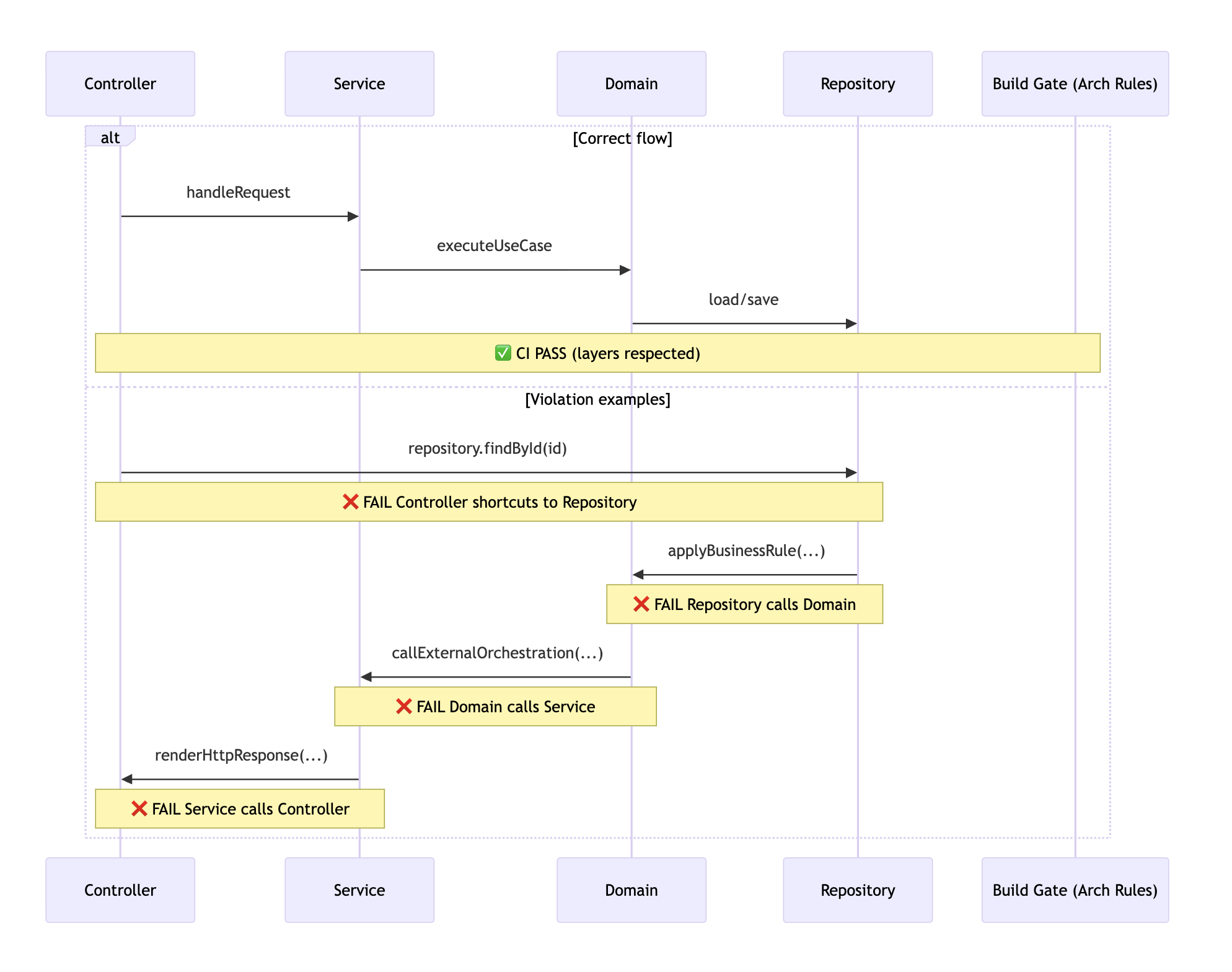
That’s not friction—that’s Protective Barriers.
2. The “Draft vs. Consolidate” Workflow
Most teams make one fatal mistake:
They commit the output of vibe sessions directly to main.
That’s like approving a city plan drawn on a napkin.
Instead, split development into two explicit phases
Phase 1: Draft (Vibing)
Prompt freely
Generate code fast
Optimize for discovery
Expect duplication and mess
Phase 2: Consolidation (Human Work)
This is where the senior engineer earns their keep.
Extract duplicated logic
Align naming with the Ubiquitous Language
Collapse helper functions into shared modules
Re-shape APIs
Consolidate Workflow

Rule of thumb:
AI may generate implementations.
Humans define/finalize interfaces and structure.
3. Define “Human-Only” Zones
Some parts of the system are too critical for probabilistic generation.
Treat them like protected districts in your city.
Examples
Allowed for AI
DTOs
Unit tests
Simple CRUD
Documentation
Mapping code
Human-Only
Core domain logic
Pricing / rules engines
Concurrency control
Security configuration
Authorization models
To instruct Humans about code that is actually for them and AI to not touch certain pieces of code, you can make it explicit:
/**
 * @AI-ReadOnly
 * Core pricing rules.
 * Changes require human review.
 */
class PricingEngine {
  // ... domain logic here
}
If using agents, specify on AGENTS.md file that AI MUST never touch code prefixed with @AI-ReadOnly comments.
To be honest the main purpose here isn’t actually for the AI… (yes, LLMs will understand our instructions)
It’s for you—a reminder that not everything should be surfed.
Summary: Speed Without Amnesia
Vibe Coding is a superpower.
But remember:
Code is a liability, not an asset.
Every line the AI generates must be:
Understood
Owned
Maintained
Use AI to accelerate the boring, mechanical, and repetitive.
Never let it silently reshape your architecture.
Surf the wave.
But make sure there’s solid ground beneath it.
